
Maintenance Management Software Built for Industrial Teams
Smart Maintenance Task Manager is a CMMS (Computerized Maintenance Management System) that covers every step, from building a preventive maintenance schedule to a technician scanning an NFC tag on a machine and submitting photo evidence of a completed task. Web dashboard for managers. Mobile app for technicians.
Never Miss a Maintenance Task Again
Unplanned machine failures don't happen randomly — they happen because maintenance was skipped, delayed, or forgotten. Smart Maintenance Task Manager eliminates that risk by automating your entire maintenance schedule.
Build recurring tasks for every machine, production line, and department. Set the frequency — daily lubrication checks, weekly inspections, monthly overhauls — and Smart Maintenance Task Manager automatically routes each task to the right technician at the right time.
- Recurring schedules: daily, weekly, monthly, custom
- Assign tasks to individual technicians or teams
- Automatic overdue alerts
- Grace period settings per task type
- Schedule across unlimited machines
- Multi-site scheduling from one account
- View all upcoming tasks on a calendar
- Bulk task creation for production lines
- Task reassignment and escalation
- Historical completion rates per asset
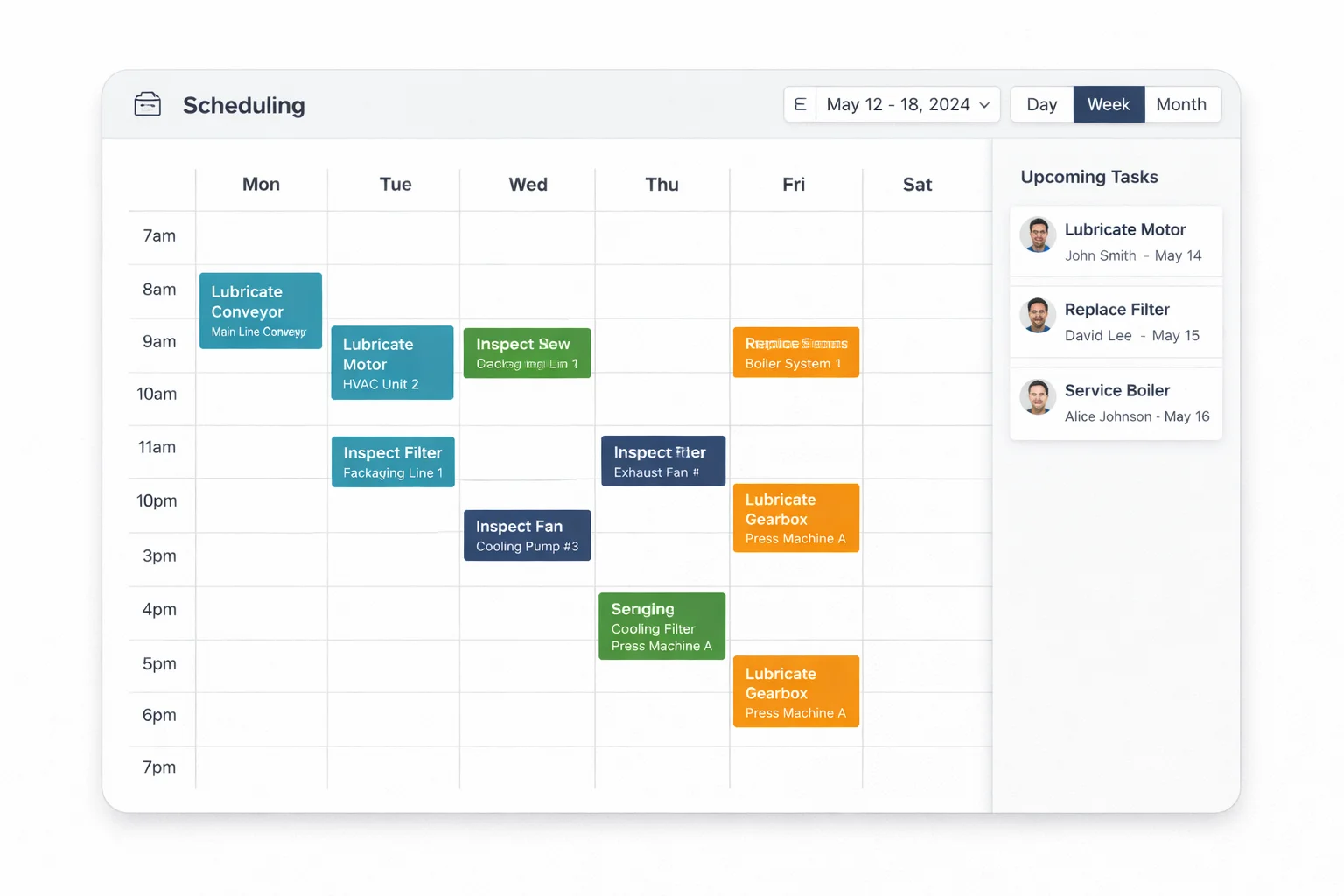
1. Build Schedule
Set frequency per machine
2. Auto-Assign Tasks
Routes to the right technician
3. Technician Completes
On a mobile app, with a checklist + photo
The Maintenance App Your Technicians Will Actually Use
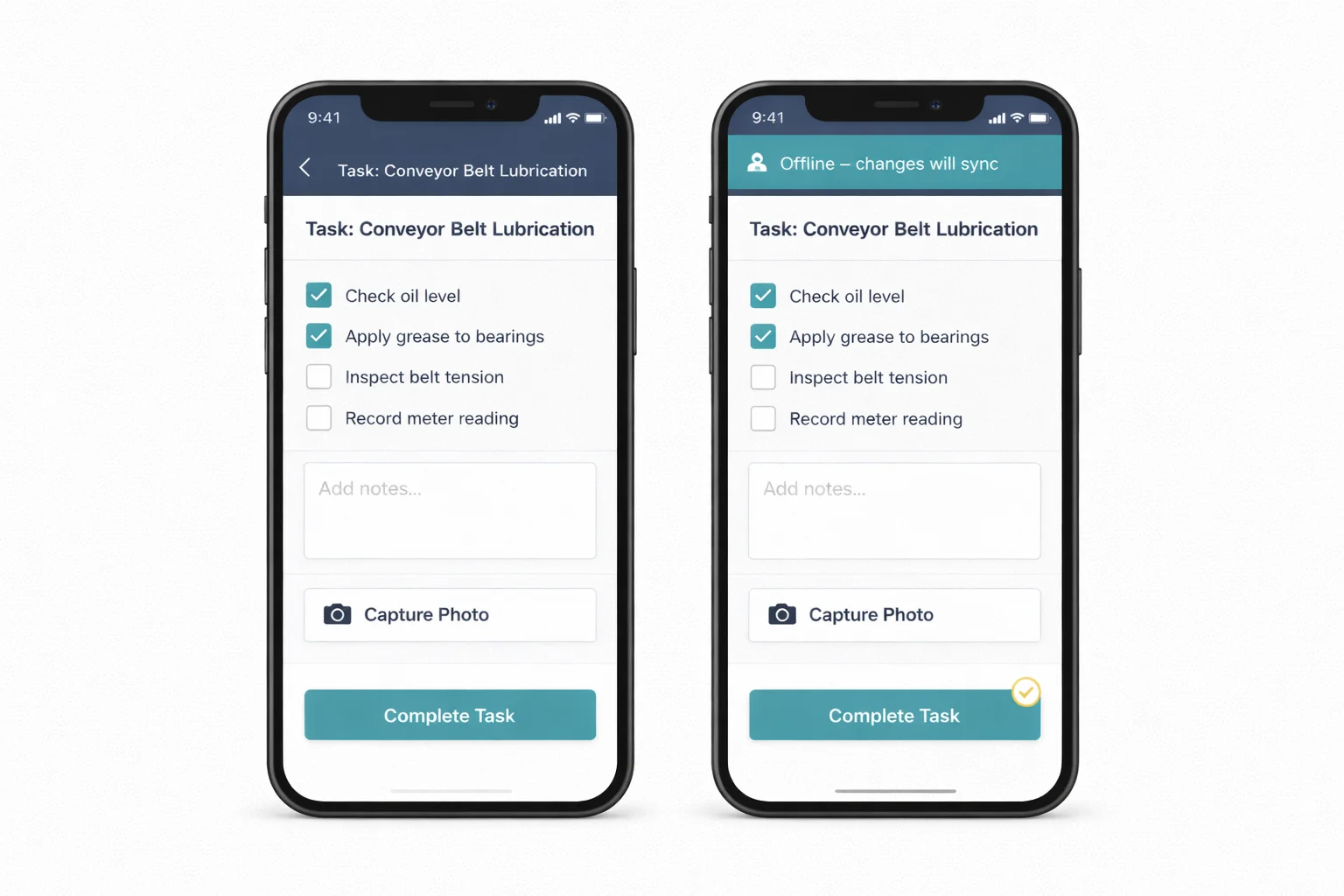
Most maintenance software is designed for the office, not the factory floor. Smart Maintenance Task Manager is built differently — the mobile app puts everything a technician needs directly in their pocket.
Simple task lists. Clear checklists. Photo capture. NFC scanning. No training needed. And when there's no internet in the plant, the app keeps working and syncs when the connection returns.
- Available on iOS (iPhone, iPad) and Android
- Offline-first: works without internet, auto-syncs when connected
- Simple task list showing today's assignments
- Step-by-step checklist for each task
- Photo and image capture as completion evidence
- NFC tag scanning — scan a machine to see its tasks
- Safety procedure acknowledgment (LOTO gate)
- Submit repair requests directly from the app
- Available in 9 languages for multinational teams
Scan a Tag. Open the Machine's Tasks.
Smart Maintenance Task Manager supports NFC (Near Field Communication) tag integration for your machines and equipment.
Place an NFC tag on a machine. When a technician taps their smartphone against the tag, the app immediately opens that machine's task list. No searching, no typing, no looking up machine numbers — instant access.
Instant Access
No typing, no searching — open tasks in under a second
Location Proof
Confirms technician is physically at the machine
Error Reduction
Eliminates wrong-machine errors
Cheap & Durable
Under $1 per tag, weatherproof, permanent

Organize Your Entire Facility, Down to Every Task Point
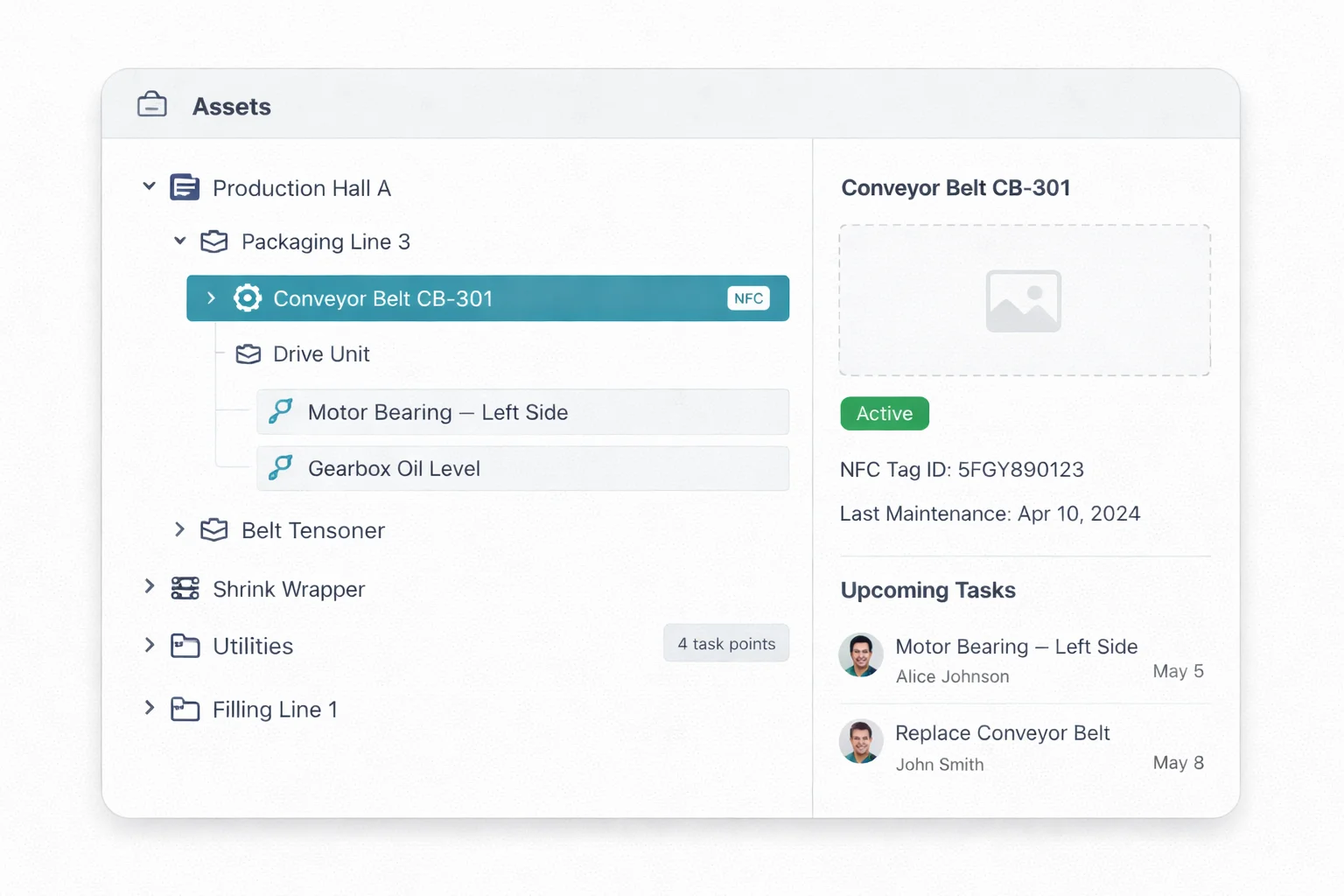
Smart Maintenance Task Manager uses a 5-level asset hierarchy to mirror exactly how your facility is structured. From the top-level department all the way down to a specific lubrication point on a machine.
Every level has its own tasks, maintenance history, and status. Managers see the full picture. Technicians see exactly where to go and what to do.
- Full maintenance history per asset (logs, photos, values)
- Attach NFC tags to sections for field identification
- Duplicate and reorganize the structure as your facility grows
- Web mapping tool to visually browse your asset structure
- Recycle bin for accidental deletions
Safety Built Into Every Task, Not Bolted On
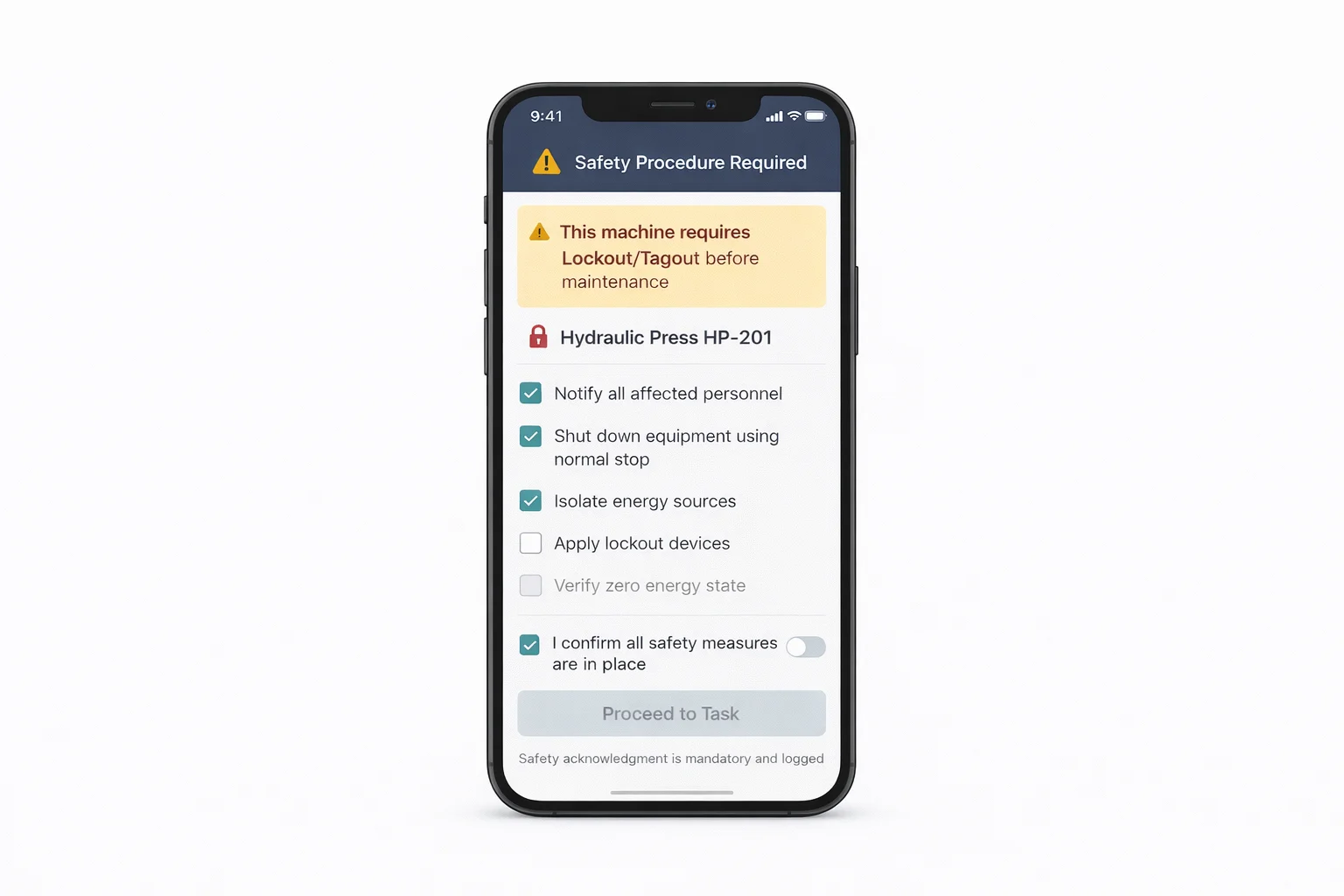
In industrial environments, safety is not optional. Smart Maintenance Task Manager enforces safety procedures before any maintenance work begins on lockout-required machines.
When a technician tries to start a task on a machine that requires Lockout/Tagout (LOTO), the app shows the full safety acknowledgment screen. The technician must confirm each safety step before the maintenance form becomes accessible. No bypass.
- LOTO gate: full-screen safety acknowledgment enforced
- Step-by-step safety procedure checklists
- Safety measures linked to specific assets
- Time-stamped, technician-attributed safety confirmations
- Complete audit trail with photo evidence
- Shutdown management with formal reason logging
- Repair request workflow with manager approval
“Safety is the first step. Smart Maintenance Task Manager won't let technicians skip it.”

Dedicated Lubrication Scheduling for Industrial Equipment
Lubrication is one of the most important — and most commonly neglected — types of preventive maintenance. Smart Maintenance Task Manager has dedicated lubrication task types with specific fields: product used, quantity applied, and technician confirmation.
Schedule lubrication intervals for each machine section, assign them to trained technicians, and maintain a complete record of every lubrication action.
- Dedicated “Lubrication” task type
- Track the product used and the quantity applied
- Lubrication product catalog (type, viscosity, manufacturer)
- Scheduled lubrication intervals per machine section
- Photo evidence of completion
- Complete lubrication history per machine
- Consumption tracking — monitor usage per product over time
- Trend analysis — spot unusual spikes signaling bearing wear
Real-Time Visibility Into Every Maintenance Activity
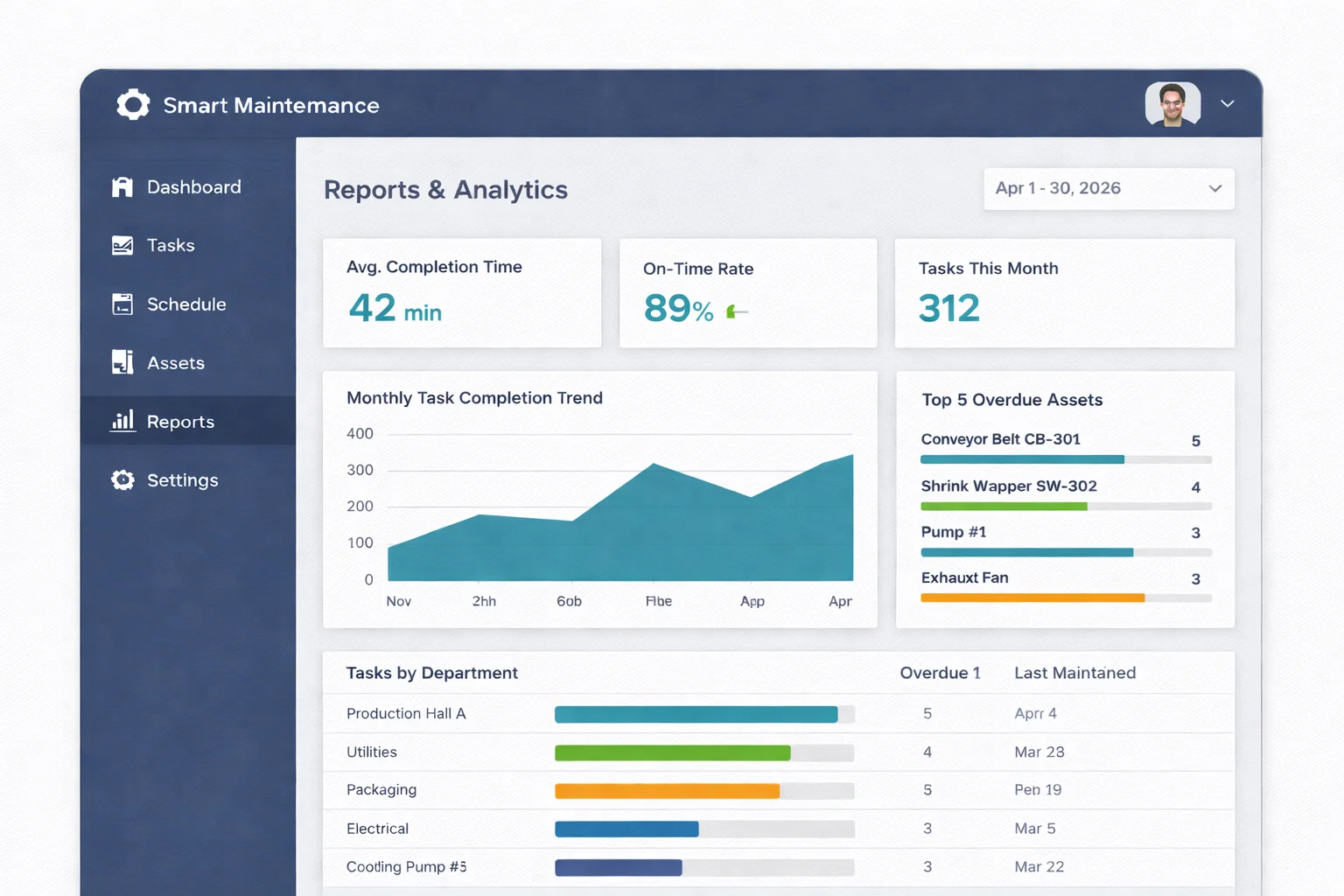
Smart Maintenance Task Manager gives managers and plant directors a real-time view of maintenance performance — without having to chase technicians or wait for manual reports.
The web dashboard shows task completion rates, overdue tasks, technician activity, and machine maintenance history. Export reports for compliance, management reviews, or internal audits.
- Task completion rate by department
- Overdue task count and trend
- Technician performance metrics
- Machine maintenance history
- Flowchart view — daily timeline per technician
- Yearly reports with year-over-year comparison
- Full XLSX export (background job, download when ready)
The Right Access for Every Person in Your Organization
Smart Maintenance Task Manager uses five user levels that ensure every person sees only what they need to do their job.
Administrator
Full system access. Manages users, roles, company settings, and all configurations. IT manager, system owner
Supervisor
Reviews reports, manages schedules, approves repair requests, and monitors KPIs. Maintenance manager
Mapper
Creates asset hierarchy, writes NFC tags, defines task types, and schedules. Maintenance engineer
Technician
Executes tasks on the mobile app, completes checklists, captures photos, and submits repair requests. Field technician
Viewer
Read-only access to dashboards, reports, and history. Director, auditor
Permissions are fully configurable — roles can be customized to match your specific organizational structure and security requirements.
One Account. Multiple Facilities. Complete Visibility.
Smart Maintenance Task Manager supports multiple production sites and facilities under a single account. Plant directors and operations managers can switch between sites and view consolidated reports.
Single Login for All Sites
Access every facility without switching accounts
Per-Site Isolation
Each site has its own data, teams, and schedules
Cross-Site Reporting
Compare performance across sites with consolidated dashboards
Complete Feature List
Frequently Asked Questions
See Every Feature in a Live Demo
Our team will walk you through the platform — web and mobile — tailored to your industry and maintenance workflows.